Poppins is a clean, rounded sans-serif font that’s super easy on the eyes. Because of its consistent letter spacing and open shapes, it reduces eye strain and helps you move through text faster — which matters a lot when you’re trying to read in a foreign language and already spending extra mental energy decoding words.
Right now “Ask AI” sits at the bottom of the panel, which means every time I want to use a custom prompt I have to scroll down to reach it. That’s a small but constant interruption to the reading flow.
This matters especially if you use custom prompts (e.g., “give me 3 example sentences at B2 level” or “explain the grammar structure here”). The whole point of a personalized prompt is speed — getting context fast and jumping right back into reading. Having to scroll to reach it every single time kills that momentum.
Both of these are low-effort changes on the dev side but would add up to a noticeably faster and more comfortable experience during longer sessions.
I find it easy to reach the “Ask AI” field with one swipe.
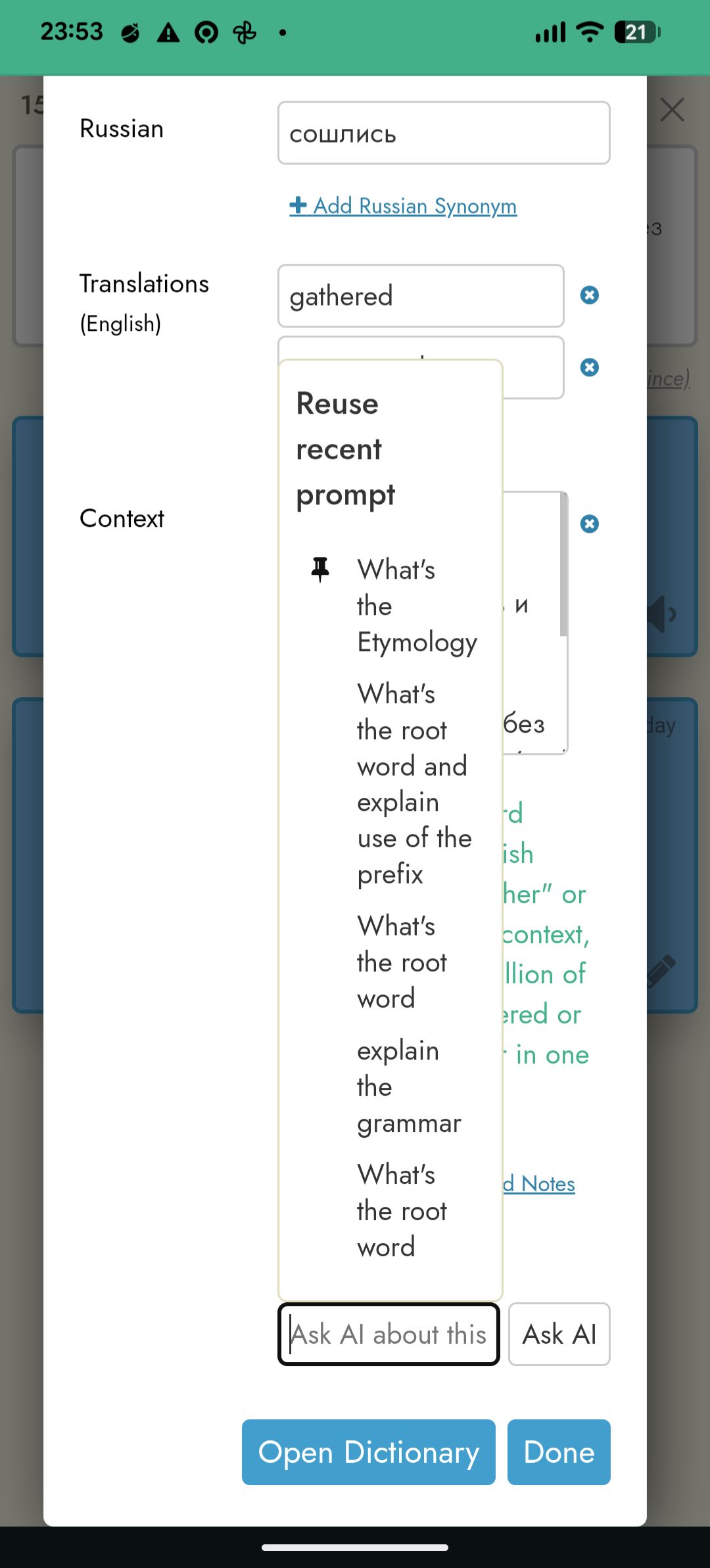
But, I feel that the prompt selection could be easier. Right now, I have to tap into the empty field for “Ask AI”, then scroll up to find my past prompt, and the UI doesn’t clearly differentiate the previous prompts (looks like a mass of text), so it takes effort to identify and pick the one I use most.
Also, there’s no way to delete duplicate prompts, which makes the list feel cluttered and noisy.
For me, this field needs a balance between picking from a list of frequently used prompts (I love asking about the etymology), and the confidence to write new prompts without the fear that the drop-down will get crowded.
Also, there’s no way to delete duplicate prompts, which makes the list feel cluttered and noisy.
For me, this field needs a balance between picking from a list of frequently used prompts (I love asking about the etymology), and the confidence to write new prompts without the fear that the drop-down will get crowded.
Yeah, I second this – I hesitate to use ask AI for one-off questions because it’ll clutter the list and maybe even eliminate some of my go-tos. And that’s a counter-productive incentive! So a checkbox to say whether to remember the question or not, or a separate box for one-off questions, or something like that would be great. And yeah, the ability to edit the list too.
Thanks for all the feedback here. I’ve just improved the “Reuse recent prompt” popup:
On small screens it’s now wider, so it isn’t so cramped
There’s a new Edit button at the top right corner of the popup. In edit mode you can pin and unpin prompts, delete any prompt, and drag pinned prompts into the order you want.
In the normal view the pin icon only shows up for pinned prompts, so the rest of the row is a clean click target.
Thanks also for the original suggestions but I haven’t changed these because they might be more controversial. I don’t think there’d be universal agreement on the font or the Ask AI placement. That said, will keep it in mind and if more people request the same thing I’ll consider it.
Could be slightly more efficient if there’s also a way to have one-off questions that never even enter the list. Now I can delete them, which is much better and reduces my hesitation to ask questions that might overrun my common ones. But if it’s a very specific question about this particular piece of text, and I follow it up with even more specific questions, there’s no need to save it/them at all and then require the subsequent steps of editing and deleting.