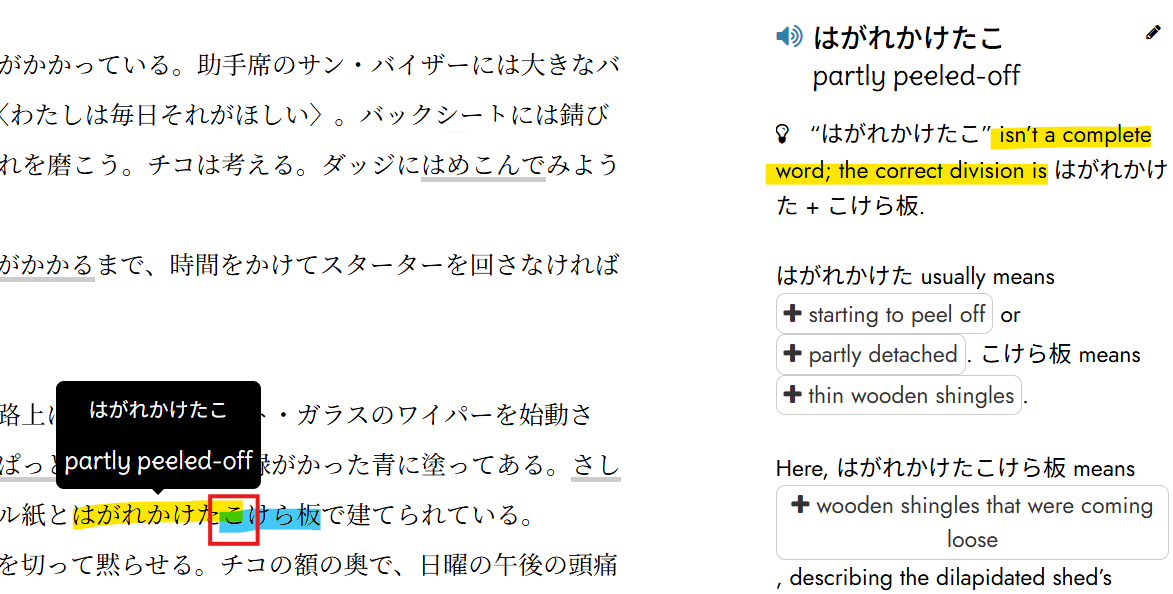
Can a setting be added to Japanese to turn off the (AI-driven?) word breaks, or at least override it in certain cases?
I sometimes have to skip adding a new word because the system doesn’t allow me to change where the word breaks are.
Example below: the こ in the red box is being attributed to the segment highlighted in yellow rather than the segment in blue. The irony is that the AI in the Explain function recognizes there’s a problem.
I don’t think the word divisions are being done with AI, since Steve wrote that you need a modern browser to see it. That makes me think the divisions are happening client-side.
I did a test myself. If you edit that word [not the text but the vocab item] and delete こ, and save that, the reader will still underline the word properly (as one that you’ve seen before) even though it doesn’t normally parse the text that way. Not sure if that helps you or if you already knew that. But you wouldn’t have to skip over the word then.
Thanks, you gave me an idea for a good workaround. I went into the editor for the text and simply added a space, and it works. Technically, there shouldn’t be a space, but whatever.