Get AI-powered example sentences while practicing flashcards on Readlang. Supports OpenAI, Claude, Mistral, Gemini, and OpenRouter.
Enhance your Readlang flashcard practice with AI-generated example sentences!
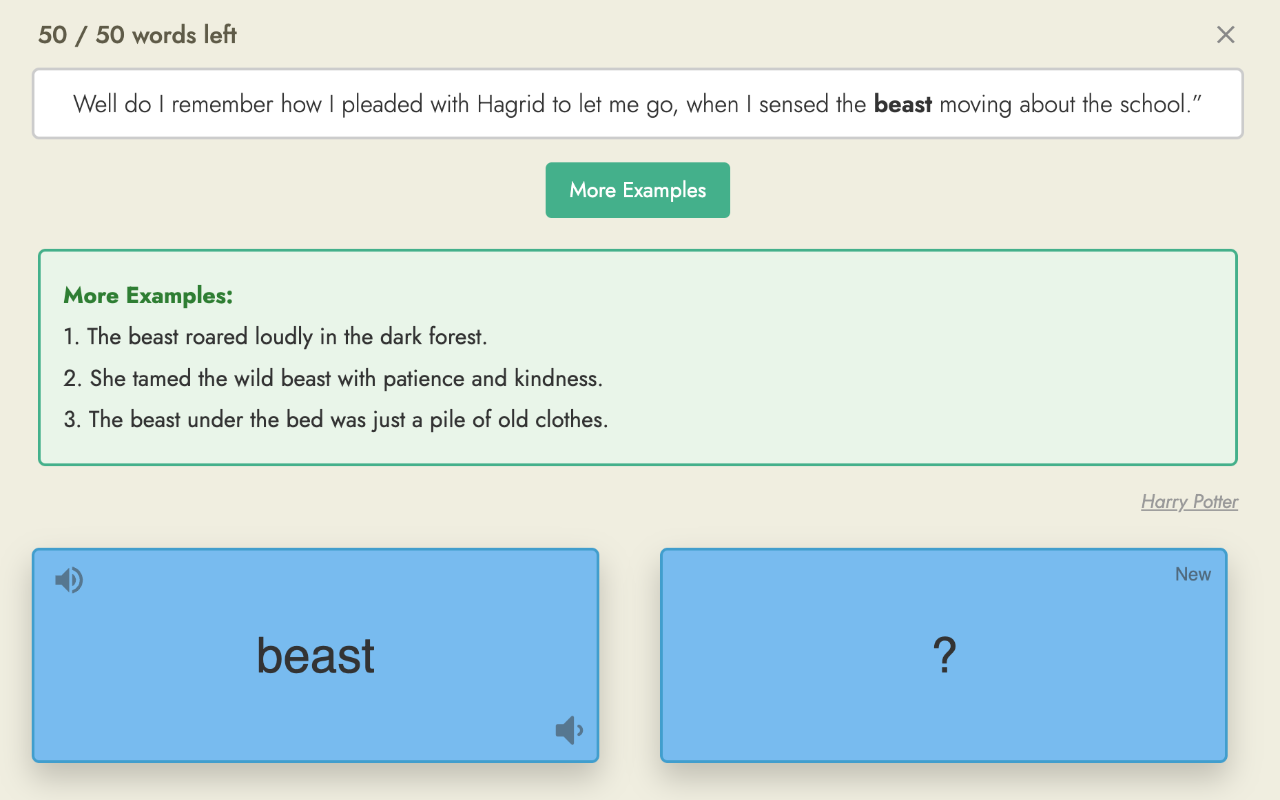
When learning vocabulary, seeing words used in multiple contexts helps you understand and remember them better. This extension adds a “More Examples” button to your Readlang flashcard practice that generates additional example sentences using AI.
 FEATURES
• One-click example generation - Click “More Examples” to instantly get 3 new sentences using your vocabulary word
• Multiple AI providers - Choose from OpenAI, Claude (Anthropic), Mistral AI, Google Gemini, or OpenRouter
• Use your own API key - Bring your own API key for full control and privacy
• Clean integration - Button appears right under the context sentence for easy access
• Auto-clears on next card - Examples automatically clear when you move to the next flashcard
 HOW TO USE
- Install the extension
- Click the extension icon in your toolbar
- Select your preferred AI provider
- Enter your API key
- Click Save Settings
- Go to Readlang and start practicing
- Click “More Examples” on any card!
 GETTING API KEYS
• Mistral AI: console.mistral.ai (free tier available)
• OpenAI: platform.openai.com/api-keys
• Claude: console.anthropic.com
• Gemini: aistudio.google.com/apikey (free tier available)
• OpenRouter: openrouter.ai/keys (access multiple models)
 PRIVACY
• Your API key is stored locally on your device
• No data is collected or sent to any server except your chosen AI provider
• No analytics, no tracking, no accounts required
 TIPS
TIPS
• Gemini and Mistral offer free API tiers - perfect for getting started
• OpenRouter lets you access many different AI models with one API key
• Leave the “Model” field empty to use the recommended default model
 PERFECT FOR
• Language learners using Readlang
• Anyone who wants more context for vocabulary words
• Students preparing for language exams
Made with  for the language learning community
 i try to tell ai before giving example consider the context