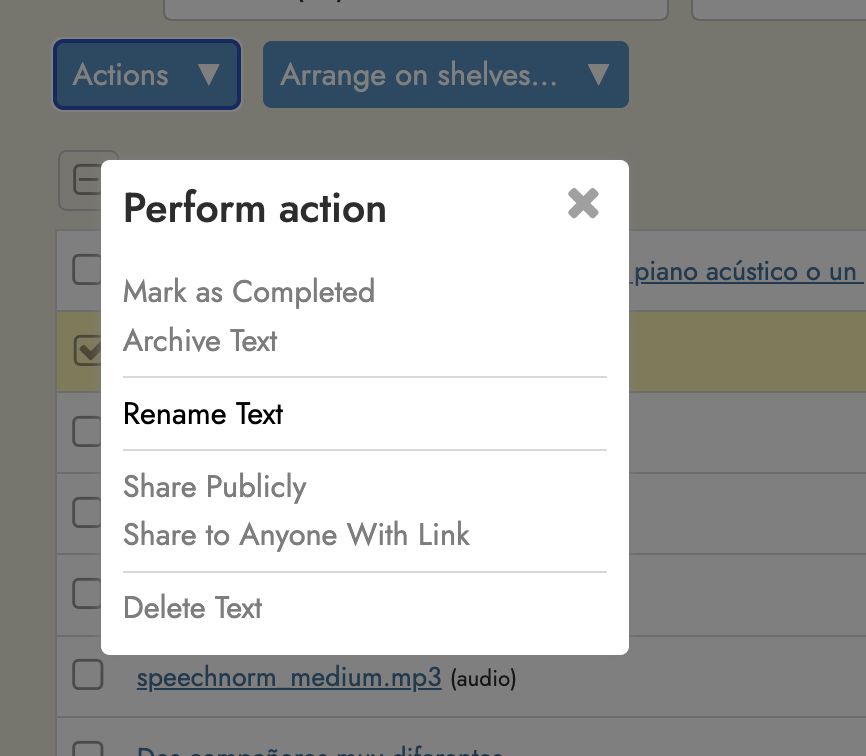
I thought there was, but I can’t find it. The obvious place would be in “library” just clicking the item and then having “rename” one of the options from the drop down list. But it isn’t there. And I didn’t find it searching this forum.
In the absence of that, not only do I have a problem where I can’t find the books because the name isn’t obvious, or conflicts, but – even worse right now – EVERY download from EVERY podcast from one site has exactly the same name: Languatalk.
Again, I think I recall you saying there was a way to do it…but it certainly isn’t intuitive and handy from the Library tab.
If you’ve uploaded it yourself, i.e. it’s not from the public library, you can do it by opening the text, and then changing it in the Title section on the Edit page.
Where is the “title section of the edit page”. I am inside the podcast text I downloaded; I can read it. How do I get to this “title section of the edit page”.
And why is this so hard to find / know? I would think everyone would want to have the ability to change a title which doesn’t suit them… especially when every text. download from the same website has exactly the same name. Maybe make that an option in the download process?
Thank you for telling me of this dark magic spellt! ;->. Please give me the magic words!
Ok. Finally found it. Buried inside the dictionary widget … how (NOT) obvious a place to put it. IMO, the option to edit and classify a downloaded text should be offered when the text is initially downloaded – that would make immensely more efficient, not to mention easy to find. Thank you! I think I will remember from now on!
I’m glad you found it, but personally I don’t think of as simply being the “dictionary widget”, nor do I see it as particularly “buried away,”. The Edit page is part of the main sidebar, which has a large menu-style symbol at the top of the page. This appears immediately you open a text you’ve uploaded.
I think of it as where everything happens, and I use it in one way or another for nearly every text I upload. It has six what I think of as pages which fulfill various functions, the dictionary page being only one of them. Others include the Edit page I was talking about, and the AA page, which controls amongst other things how the text looks, and what voices are used for Read Aloud.
Incidentally, I have nothing to do with the Readlang organisation, I’m just an ordinary user like you. If I had any criticism it would be that there are some useful features on these pages, not so obviously labelled, such as “Ignore single new lines” at the bottom of the Edit page. In fact this removes line breaks. I had been using an external program to do this for ages before I tried ticking this box, and voilà, what I had been wanting had been there all the time.
Yes, I am aware that some people had no problem finding that function – and then remembering where it was. But – for me – there is NOTHING intuitive nor obvious about a feature to edit titles being part of the dictionary function…which is what that widget originally meant, I think? On the other hand, the vertical “…” is, at least for me, an obvious candidate for a menu of functions. Which it is – it is just that the feature isn’t there.
But, again, taking a step back, while a feature to rename a document may be placed under a menu, why would I EVER want to import a transcript from a given site and have the ONLY name, automatically applied, be ONLY the website name…not even being as useful as a website name with an auto-incrementing number? I’ve got dozens of transcripts now with exactly the same name, no date, no abilty to distinguish them at all … except where they came from ???
When I was a programmer in the 1970s we used to joke about things being “not a bug, only a feature”! ;->. I mean if you pressed a key and the program blew up, we would joke about that being a feature.
That said, and having mercy on Steve – I am STUNNED at how much Steve was able to do basically all on his own, and only in his spare time. So I try to be nuanced in my frustrations here. Steve is an amazing programmer and quite an amazing human being, the way he handles all the responses, and makes the majority of readlang FREE to the world! (I really admire him)