How to adjust the speed of the reading?
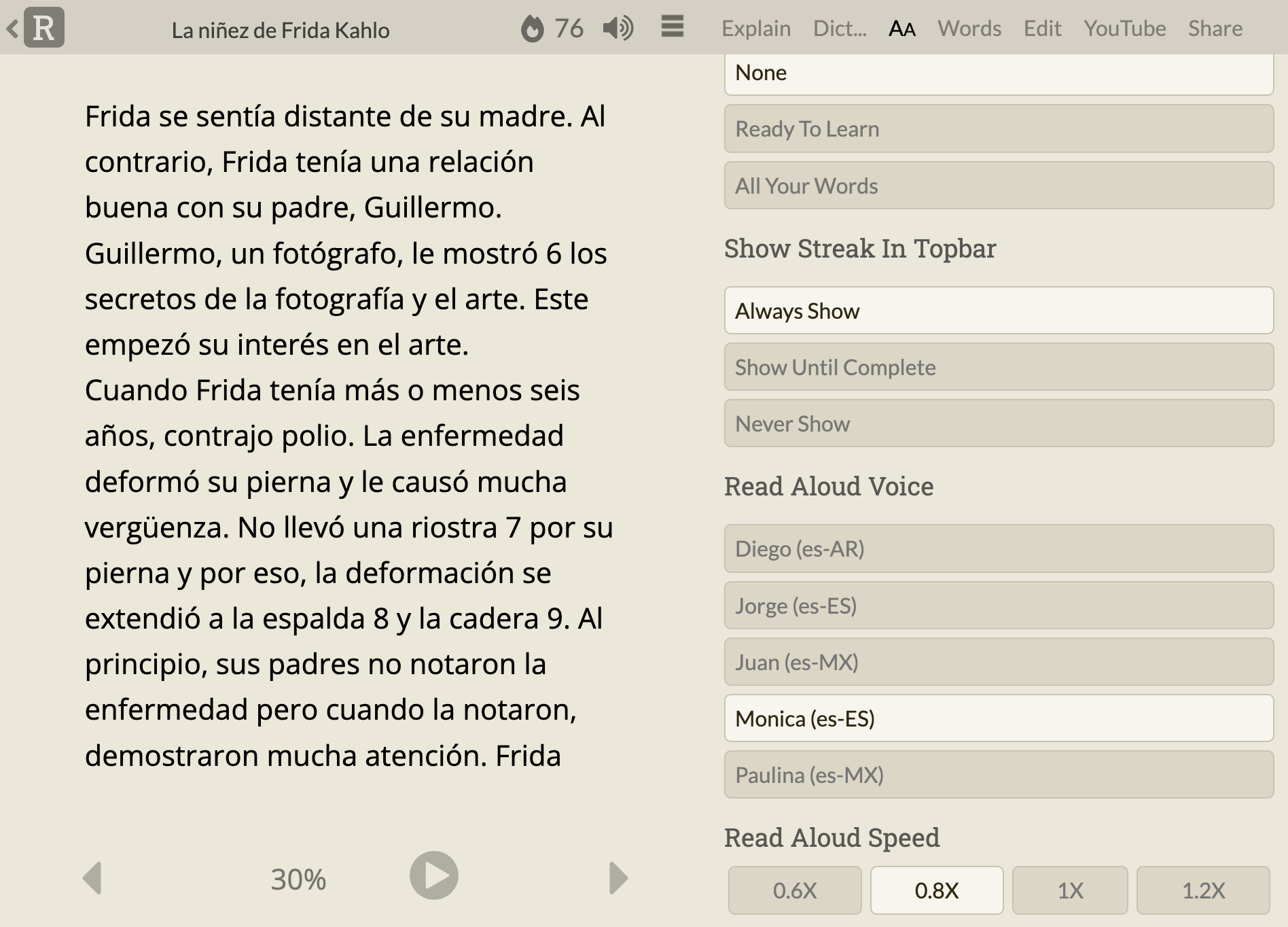
Thank you So much, Now I able to adjust the speed
1 Like
Where is the “AA tab in the sidebar”? Ok. Just found it. After wasting probably an hour looking, looking, looking…before coming here to ask (and then did a search and found this post).
Suggestion: I think that is a non-intuitive and non-standard place to put a reading speed adjustment. I just spent probably 45 minutes looking for reading adjustments, but even knowing/believing it was someplace I couldn’t find it. Looking under text FORMAT options never occurred to me…and I think that is actually pretty weird…especially since you put this on the very bottom…so if you open the AA and see the text formatting options one could easily just close it and go look elsewhere (which is what I originally did).
Underneath the vertical “…” symbol at top you have some configuation settings. Why not put everything there and have the n other areas you use a ‘standard’ configuration/gear symbol for making adjustments. Even better would be to replace the vertical “…” with a machine GEAR (the standard, generally, for settings). Then put ALL configurations there?
Can the speed be slowed down further to make it more suitable for “shadowing” (reading along with the voice)? I can probably do it at 70% but only because I’m pretty familiar with the sounds, after all this time. In shadowing I want to work on my accent, and the slow down would be helpful. Of course, I can loop back with a keystroke, but only because I picked that up somewhere else. (If I was a new user, I think I would miss a lot of features which are actually here, because they are buried in places which – at least to me – are relatively undocumented, relatively untravelled, and not always hierarchical.
Let me use this as an opportunity to wish you, and everyone, a great holiday season!
I agree the placement and labelling of the settings is not obvious and should be improved.
Note that the speed options do go down below 70%. The lowest option is currently 0.6X or 60%. And in fact, all these speeds are actually made 0.85 times slower than the stated speed. The reason for this is that the voices were designed for native speakers and I think for language learners playing at 0.85X seems a better default baseline, at least on the devices I’ve tested (remember that these voices are all provided by your browser/device), so when you play at 1X Readlang is telling your device to play at 0.85X behind the scenes, and when you play at 0.6X it’s really 0.5X behind the scenes.
1 Like