I’m trying to cancel my subscription (it just auto renewed). When I login to the site I can’t find an option to unsubscribe, only to subscribe. I’ve logged in via my Google account but I’ve also done the thing where you can change the Google account email (recent feature from the end of last year). Is it possible that the subscription is tied to the actual name of my email address (which has changed) not the underlying account numeric id (which has not)?
I can see that there’s no premium subscription attached to the account you are currently writing from. Please email me directly at steve@readlang.com and let me know the email address you used when originally subscribing to Readlang and we’ll work it out.
Just for the record, even though it won’t work from the account you are currently using, the normal way to cancel a premium subscription is:
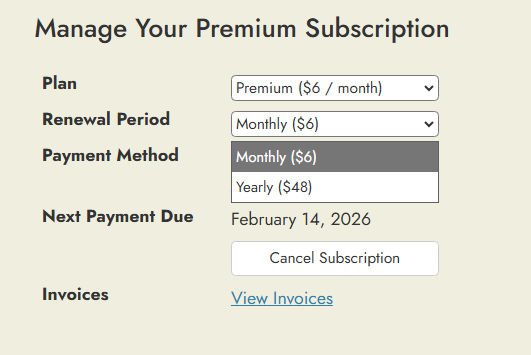
Go to the account page (also accessible by clicking the drop down menu at the top right of the page and selecting “Premium Subscription”)
Click “Cancel Subscription” (this will cancel auto-renewals but your subscription will still remain active until the renewal date)
You’re right! My mistake. You should click the “Cancel Subscription” button instead. This will cancel auto-renewals but you’ll still get to use your Premium plan up until February 14th.