Love the feature Steve, thanks! The list at the end of vocab to add, a checkbox to deselect all would be nice, then I can just check the few that I want.
2 Likes
Whoa. Surprising how helpful it is. Also, I didn’t realize Ami would remember previous convos. That’s nice.
Obviously, I’ll take it as-is but maybe a fun feature would be Ami asking comprehension questions about what I’ve read today.
Oh, I also like how Ami kinda draws the conversation to a close. Feels contained.
Just, yes.
2 Likes
Tried it, loved it. Will be using it daily – the cards it creates from it is just wonderful.
The only addition I’d have at this point (day one) is that I would love a instruction for it.
Like ‘instructions: focus on conversation in a relaxed games studio; age group 18-35’ (to give direction, and in my case that’s my main use case).
But if friend learns over time, ignore this.
Either way it’s fantastic 
1 Like
UPDATE: Conversations are now available in all Readlang’s languages, with the exception, for technical reasons, of languages with right-to-left text (e.g. Arabic) and those which don’t use spaces to separate words (e.g. Japanese).
Tip: if the language you study doesn’t have good quality TTS (text-to-speech) in Readlang, try Microsoft Edge browser which has a good selection of voices covering a lot of languages.
Keep the feedback coming!
4 Likes
Absolutely love this this new feature, well done! Keep up the good work, it is much appreciated!
3 Likes
Incredible,that was quick! Great work Steve.
1 Like
This site is even better! Just tried it for the first time with Swedish. This is just what I needed. It forces me to actively recall words to communicate effectively, and the best thing is I get immediate feedback and corrections. Nice job Steve!
1 Like
Gotta say I love it. Extremely useful for me. Thanks a million.
1 Like
I see that you expanded the languages supported, that’s great! I have been doing something similar with Gemini directly, but I like this UI a lot. However, I noticed that the TTS voice used is different and much lower quality than the neural based one used in other parts of the site (at least for Slovak).
Edit: I didn’t see Steve’s earlier comment about using Edge, that does indeed use a much better TTS.
1 Like
After having a few more conversations, I have another suggestion for improvement:
When it corrects what you say, you get long sections of “green”, and so the vocab list at the end isn’t really a vocab list. I’d like to add the one word in that green section I didn’t know, but not the entire phrase. Maybe there is a way to avoid linking like that? I’m not sure the best way to fix that issue.
1 Like
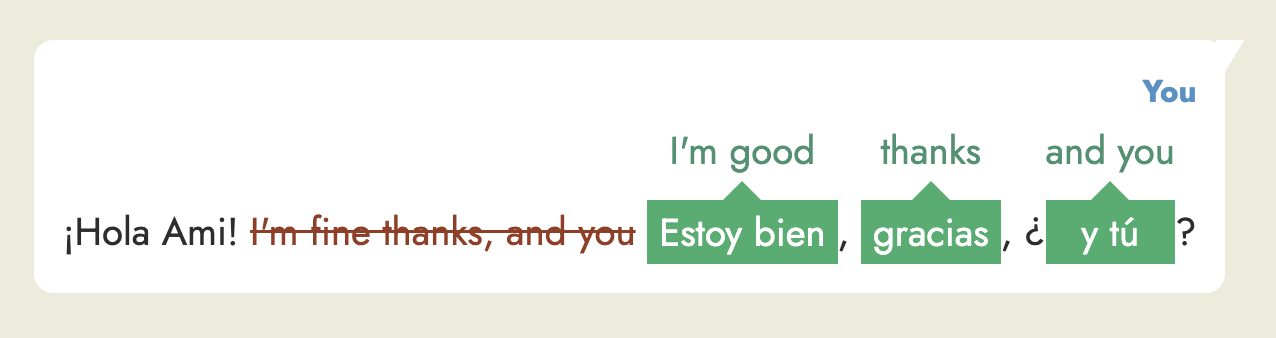
That’s a good point. I’ve just made a change which goes some way to addressing this, which is to split corrections based on punctuation like this:
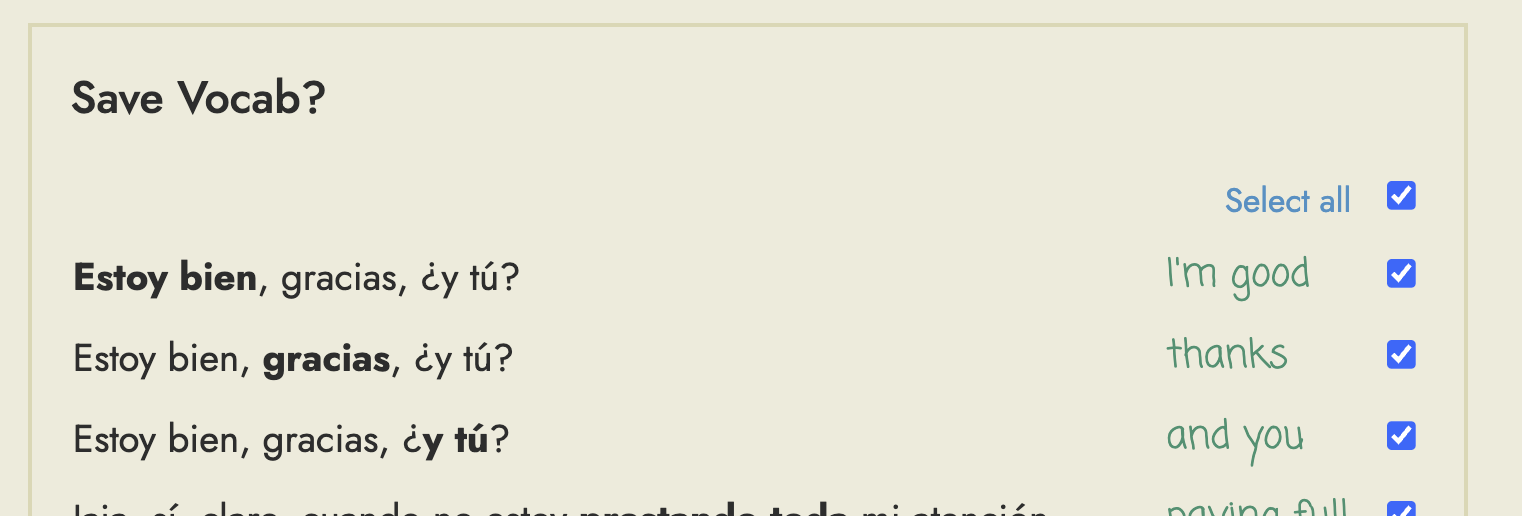
So that at the end you’ll get multiple smaller items to practice:
This is fantastic, Steve! Thanks for adding it to the Readlang platform, which I’ve been using every day and have been enjoying.
I love that the chat starts and then it ends. (Other chatbots sort of leave you hanging and you don’t get that feeling that you’ve completed a conversation. I like that this one has a conclusion at each session.) I’ll be using this daily now as well. Bravo!
3 Likes
Looks like you need to have at least one word saved before the chat feature appears on the Dashboard or Practice page. It was immediately available in Spanish for me, which I’ve used before on ReadLang, but it wasn’t available in German until I saved a few words from a few texts.
1 Like
This is really awesome! Is there anyway this could be connected to texts you’re reading? It would be very cool to read an article and have a conversation after to practice the vocab. It could then match the level of lexical difficulty of the text. If it asked you questions about the text it would also make it an extremely great study tool. I know Readlang is dedicated to language learning but honestly a lot of the new features would make this an incredibly useful study tool in your main language if you chose to market it in that way.
7 Likes
Thanks, I’ve fixed this now, so it will be available on the Home/Dashboard page even if you haven’t translated any words yet.
1 Like
I’ve been dreaming of exactly this kind of interface since the beginning of the LLM trend. I think it’s a perfect use case for it.
One cool extra feature would be to be able to ask explanations about a word within the conversation itself, directly by clicking on it.
Anyway I hope this continues, it’s probably my favorite feature in Readlang.
1 Like
I tried this briefly today (for French) and value it more than standard chatbots, given the corrections. It also felt more natural in terms of speech patterns for some reason. It’s an extremely valuable addition. Thanks!
2 Likes
The more I use this feature, the more I like it. It adds a whole new dimension to my learning.
2 Likes
I am very early in my studies but this is a great feature with the feedback and correcting my mistakes. So thank you!
3 Likes
Hi Steve,
Thanks for the new Conversation feature. I am using it every day (in French) to get some sort of practice habit.
Would it be possible to add export option, both for original text and corrected text? I’m feeding my Perplexity Space with all my writing mistakes and it prepares custom material and practices for me to fix those mistakes.
At the moment, I dump screenshots manually to it, but it struggled sometimes detecting the original vs corrected, due to the way they are currently displayed.
In any case, thanks again for this.
2 Likes